Capture the right frame
Record the full display, a custom area, one program window, or supported games.
Record tutorials, gameplay, product demos, and authorized meetings with flexible capture modes, system audio, microphone, webcam, and hardware acceleration.
Windows 7, 8, 8.1, 10, and 11 · Try before you buy
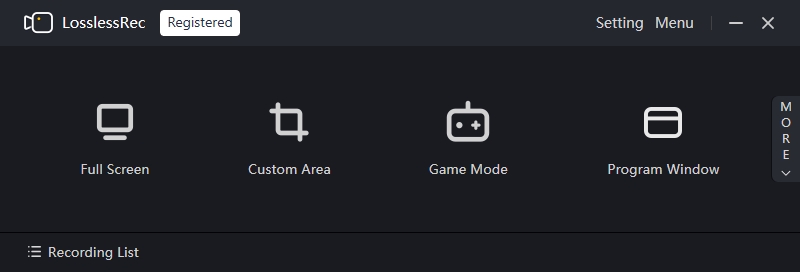
Choose a mode, select your sound sources, and record. LosslessRec avoids the scene-and-source setup of broadcasting software while offering more recording control than built-in Windows capture.
Record the full display, a custom area, one program window, or supported games.
Combine system audio, microphone narration, and an optional webcam overlay.
Use cursor effects and annotation tools to make tutorials and demonstrations easier to follow.
Schedule recordings and work across multiple monitors when your workflow needs it.
LosslessRec can use compatible NVIDIA, Intel, or AMD hardware acceleration.
Review supported systems, GPUs, inputs, formats, codecs, and frame-rate options before downloading.
View technical specs →| Need | Built-in Game Bar | OBS Studio | LosslessRec |
|---|---|---|---|
| Quick game or app capture | Good for basic capture | Requires source setup | Choose a mode and record |
| Custom area or program window | Limited | Available with configuration | Dedicated capture modes |
| Streaming production | Not designed for it | Strong choice | Focused on recording |
| One-time purchase option | Included with Windows | Free and open source | Lifetime plans available |
Comparisons describe typical workflows, not every feature or configuration of each product.
The interface keeps capture mode, sound, microphone, webcam, and recording controls together so you can verify the setup before pressing record.
Use the public manual, specifications, and comparison content to check whether LosslessRec fits your computer and recording job.
Install LosslessRec, understand the interface, and capture your first screen.
Open quick start →Review systems, hardware acceleration, inputs, codecs, and output options.
View technical specs →Compare setup, recording controls, performance considerations, and pricing.
Read comparison →Try the recording workflow first, then choose an annual or lifetime license if it fits.
Only record content you own or are authorized to capture.